
Information Technology HelpDesk
[gtranslate]
IT HelpDesk
Staff Windows Printing
Installing Printers / Copiers
Please see the screen shots below on how to add printers on your Windows device.
1. Find and double-click the SD42 Printers folder in your desktop

2. To install Konica Minolta printer driver, find your school location code then copiers (For example, PMS-Copiers)

To install Xerox printers, find Virtual-BW for Black & White and Virtual-Colour for colour printing (PMS-Virtual-BW and PMS-Virtual-Colour)
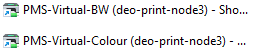
3. Double-click to add the printer to your system
4. If you’re unable to find SD42 Printers folder in your desktop, please install the app Printers Desktop Shortcut from Company Portal.
Using Konica Minolta Photocopiers
Printing Basics
- Double-sided printing, stapling and hole-punching
- Print Presets (Favourites) PC – Saving your settings
- Customizing Print tab – Functions you use often
- Saving Print Defaults PC
Printing on Special Paper
- Printing on Special Paper
- Printing on Custom Paper Sizes
- Printing on Cardstock PC
- Banner Printing PC
- Banner Printing Instructions