
What is Phishing?
Phishing is a type of cyber attack where criminals impersonate trusted organizations
to trick you into revealing sensitive information such as passwords, banking details,
or personal data. These attacks often arrive through email, text messages, or fake websites.
Common Signs of a Phishing Email
- Urgency or threats: “Act now or your account will be suspended.”
- Too‑good‑to‑be‑true offers: Free gift cards, prizes, or coupons.
- Suspicious links or attachments: Hover over links before clicking to check the real destination.
- Generic greetings: “Dear Customer” instead of your name.
- Poor grammar or spelling: Often a sign of malicious intent.
- Unusual sender address: The domain does not match the organization it claims to be from.
How to Protect Yourself
- Verify before you click: Contact the sender using official channels.
- Check the URL: Look for misspellings or suspicious domains.
- Never share personal info: Legitimate organizations will never request your password via email.
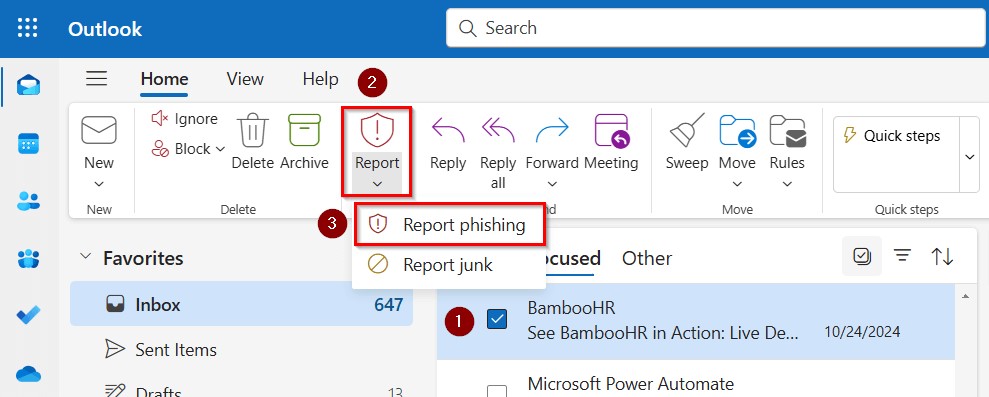
- Report suspicious emails: Use the Outlook “Report Phishing” button or notify SD42 IT.
What to Do If You Clicked on a Real Phishing Email
- Disconnect from the internet immediately if you suspect malware.
- Do not enter any information if prompted by the phishing site.
- Change your passwords immediately, especially for your SD42 Microsoft 365 account.
- Enable Multi‑Factor Authentication (MFA) if not already enabled.
- Notify the SD42 IT Department right away.
What to Do If You Clicked on a Real Phishing Email
- Outlook Desktop App: Select the suspicious email → Home tab → Report → Report Junk or Report Phishing.
- Outlook on the Web: Open the email → More actions (…) → Report → Phishing or Junk.
- Reporting ensures Microsoft removes the email and analyzes the threat.
- Always report suspicious emails instead of deleting them.
Helpful Links
Government of BC – Phishing Awareness
Microsoft Security – What is Phishing?
© SD42 IT Department – Stay Cyber Safe